Real-time rollups without a Lambda architecture
When dashboards spike and queries crawl, you don't need a second batch system or a Lambda architecture. In QuestDB, materialized views (MVs) precompute time-series rollups incrementally, so charts stay fast and you keep a single stack. MVs are GA and production-ready in modern QuestDB versions. (QuestDB)
Concept, at a glance
A materialized view is a physically stored result of a time-bucketed query (e.g., 15-minute OHLC bars). As new rows land in the base table, the MV incrementally refreshes only what's new - no full re-scan of history. You get large speedups for common aggregates and stable dashboard latency. (QuestDB)
What materializes well
- Downsampling with
SAMPLE BY(per-minute/hour/day rollups) - Time-based
GROUP BYaggregates (avg, sum, min/max, first/last) - "Latest value per key" materializations for fast current-state views
Rule of thumb: if a query powers a chart tile and the raw table grows fast, precompute it.
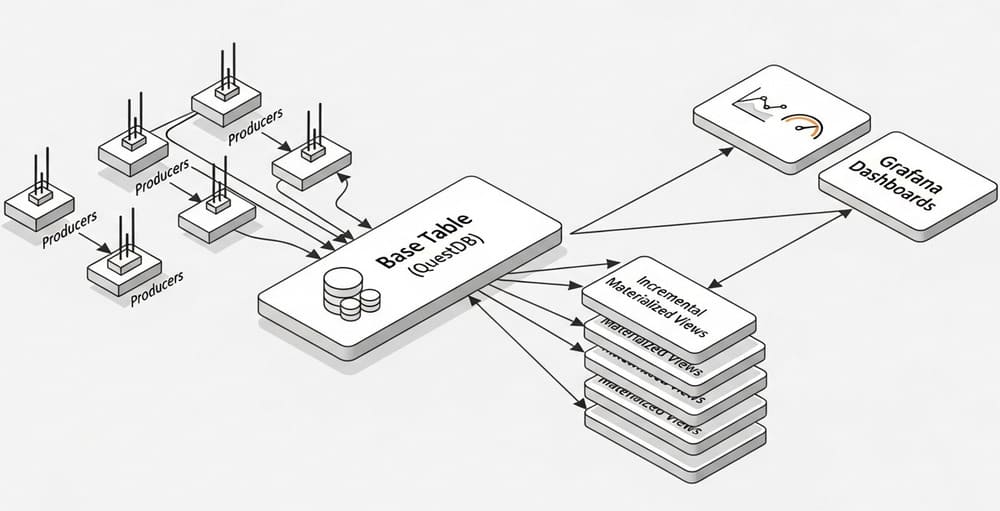
Architecture: one database, no Lambda
[Producers] ──ILP/Kafka/PGWire──> [Base table]
                                    │
                                    └─(incremental refresh)─> [Materialized view(s)]
                                                             └─> [Grafana / API / Alerts]
- Single system: no second batch/ETL framework to maintain.
- Incremental updates: low write overhead; refresh is triggered by base-table transactions (or timers/manual). (QuestDB)
The SQL you'll actually use
1) Create a time-series base table
CREATE TABLE trades (
  symbol SYMBOL,
  side   SYMBOL,
  price  DOUBLE,
  amount DOUBLE,
  ts     TIMESTAMP
) TIMESTAMP(ts) PARTITION BY DAY;
2) Precompute OHLC every 15 minutes (incremental and immediate)
CREATE MATERIALIZED VIEW trades_ohlc_15m
WITH BASE 'trades' REFRESH IMMEDIATE AS
SELECT
  ts, symbol,
  first(price) AS open,
  max(price)   AS high,
  min(price)   AS low,
  last(price)  AS close,
  sum(amount)  AS volume
FROM trades
SAMPLE BY 15m;
This refreshes as new data arrives and stores results in partitions chosen automatically from your sample interval. (QuestDB)
3) Timer-based refresh (near-real-time)
ALTER MATERIALIZED VIEW trades_ohlc_15m
SET REFRESH EVERY '1m';
Timer refresh is useful when you prefer predictable compute over per-insert refresh. You can switch strategies anytime. (QuestDB)
4) Manual refresh (for backfills or controlled rebuilds)
ALTER MATERIALIZED VIEW trades_ohlc_15m SET REFRESH MANUAL;

-- later, on demand:
REFRESH MATERIALIZED VIEW trades_ohlc_15m INCREMENTAL;
-- or, when schema/events require it:
REFRESH MATERIALIZED VIEW trades_ohlc_15m FULL;
Range refreshes let you recompute a specific time slice. (QuestDB)
5) Keep the view lean with TTL
ALTER MATERIALIZED VIEW trades_ohlc_15m SET TTL 8 WEEKS;
TTL removes full partitions beyond the retention window; the period must be a whole multiple of the view's partition size. (QuestDB)
Refresh strategies: which one when?
| Strategy | How it updates | When to use |
|---|---|---|
IMMEDIATE | On base-table commits; incremental | Realtime dashboards where freshness ≈ ingestion |
EVERY '1m' | Timer; periodic incremental refresh | Smoothing compute, predictable cycles |
MANUAL | Only when you call REFRESH | Backfills, heavy rebuilds during off-peak |
PERIOD (...) | Time-zoned, fixed-interval availability windows | Markets / devices that publish on clear periods |
All are first-class SQL: CREATE … REFRESH … and ALTER … SET REFRESH. (QuestDB)
Real example: minute-level rollups + "latest per symbol"
Goal: a dashboard with (1) minute bars and (2) the latest known price per symbol.
-- Minute rollups
CREATE MATERIALIZED VIEW trades_1m
AS
SELECT ts, symbol,
       first(price) AS open,
       max(price)   AS high,
       min(price)   AS low,
       last(price)  AS close,
       sum(amount)  AS volume
FROM trades
SAMPLE BY 1m;

-- Latest snapshot per symbol (query uses LATEST ON at read time)
SELECT * FROM trades_1m
LATEST ON ts PARTITION BY symbol;
Time-series clauses like SAMPLE BY and LATEST ON are native to QuestDB and work with MVs. (QuestDB)
Best practices
Design the base table well
- Choose the designated timestamp correctly at table creation; it drives time-series operations and can't be changed later. Partition by a granularity that matches your query windows. (QuestDB)
- Favor SYMBOL over free-form strings for high-cardinality tags; it reduces memory and speeds joins/lookups.
Keep MV queries incremental-friendly
- MV queries must use
SAMPLE BYor a time-basedGROUP BYon the designated timestamp. - Avoid
FILL,FROM-TO, andALIGN TO FIRST OBSERVATIONinside the MV definition; they aren't allowed for incremental refresh. (Use them in ad-hoc selects if needed.) (QuestDB) - If your MV query has a
JOIN, only the base table triggers refreshes. Pick the right base viaWITH BASE. (QuestDB)
Pick the right refresh mode
IMMEDIATEfor hot dashboards; timer refresh for predictable CPU;MANUALfor backfills and large recomputes. Switch modes withALTER … SET REFRESH. (QuestDB)
Control footprint with TTL
- Apply TTL to the MV independently from the base table. TTL deletes whole partitions beyond the window - plan partition sizes accordingly. (QuestDB)
Operate with visibility
- Inspect MV status and metadata (e.g., last refresh) via meta functions and system views; use
REFRESH … FULLto rebuild after invalidation events like schema changes. (QuestDB)
Common pitfalls (and how to avoid them)
- The MV isn't updating. You likely used the wrong base table or a disallowed clause in the query; fix the
WITH BASEand validate constraints. (QuestDB) - Backfill didn't show up. If a refresh limit/strategy skipped older data, run a range or full refresh deliberately. (QuestDB)
- Storage grew faster than expected. Your sample interval is too fine or TTL is missing. Coarsen the bucket and set
SET TTL. (QuestDB) - Schema change broke the view. Certain schema ops invalidate the MV; rebuild with
REFRESH … FULLor recreate. (QuestDB)
Performance notes
- MVs bound latency for historical ranges; queries read mostly the latest partition plus precomputed history.
- Incremental refresh keeps write overhead minimal and separate from your read workload; newer releases isolate MV refresh pools for stability in Enterprise. (QuestDB)
MVs vs a classic Lambda architecture
| Aspect | QuestDB Materialized Views | Lambda (speed + batch layers) |
|---|---|---|
| Systems to run | One database | Multiple systems/frameworks |
| Freshness | Near real-time with IMMEDIATE or timed | Depends on stream/batch sync |
| Complexity | Low (pure SQL) | High (dual pipelines, reconciliation) |
| Rebuilds | REFRESH … (incremental/range/full) | Reprocess in batch layer |
Takeaways
- You don't need Lambda to keep time-series dashboards fast.
- In QuestDB, create MVs on your hottest queries, pick a refresh strategy, and apply TTL.
- Keep MV definitions incremental-friendly (
SAMPLE BY/time-GROUP BY, correct base table, noFILLin the MV). - Use range/full refresh for backfills and schema changes, and monitor MV metadata.
Reference
- Materialized views guide (concepts, DDL, constraints, examples)
- CREATE MATERIALIZED VIEW
- ALTER MATERIALIZED VIEW SET REFRESH
- REFRESH MATERIALIZED VIEW (incremental/full/range)
- ALTER MATERIALIZED VIEW SET TTL
- SAMPLE BY and time-series SQL



Leave a Comment