From Files to Facts: Oracle External Tables, SQL*Loader vs Data Pump, and CTAS Pipelines with Stats Automation
Terabytes of CSVs and a deadline for dashboards: the bottleneck is rarely storage. It's the path from files to optimizer-ready tables. In Oracle, the choices - External Tables, SQL*Loader, Data Pump, and CTAS - can produce either a clean conveyor belt or a tangle of brittle steps. This guide builds the conveyor belt.
What's at stake
- Latency to insight: The faster tables land, transform, and get statistics, the sooner the optimizer stops guessing.
- Cost and risk: Redo/undo, logging, and failed loads quietly degrade performance and recovery objectives.
- Repeatability: "Works on my laptop" is not an ingestion strategy. Pipelines need deterministic, auditable steps.
Architecture at a glance
Landing → Staging → Modeled (CTAS) → Stats → Serve
- Landing: Files in filesystem, ACFS, NFS, or object storage gateways.
- Staging (External Table): Schema-on-read metadata for fast preview, filtering, and validation.
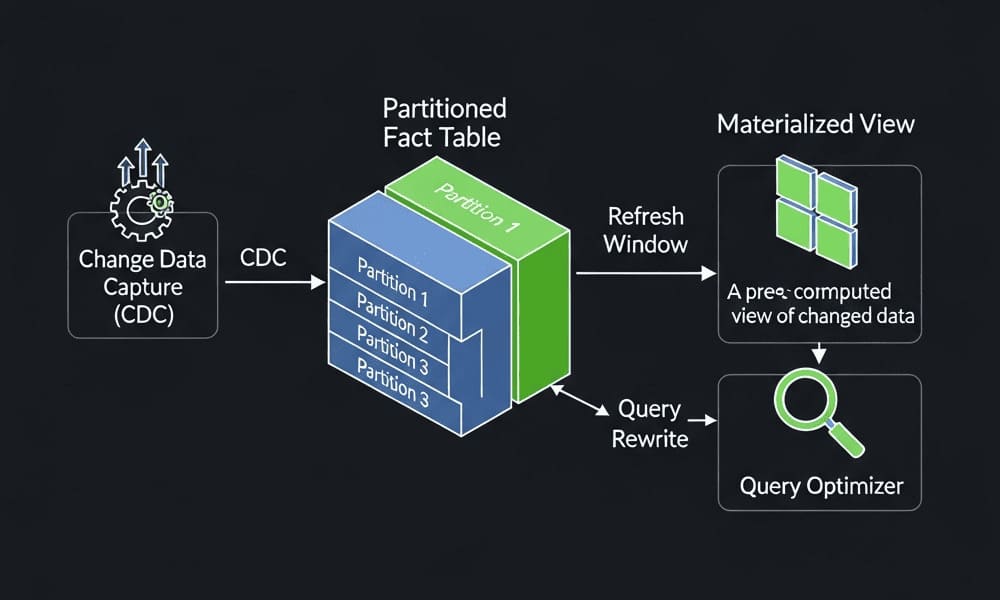
- CTAS: Create Table As Select to materialize clean, compressed, partitioned data.
- Stats Automation: Publish fresh table/partition + column stats so the CBO makes correct plans.
- Serve: Partition exchange into prod tables, or use the CTAS table directly.
Option 1: External Tables (schema-on-read, parallel-friendly)
Use when you want SQL over files without ingesting first.
-- 1) Directory over landing path
CREATE OR REPLACE DIRECTORY landing_dir AS '/u01/data/landing';

-- 2) External table over CSV using ORACLE_LOADER
CREATE TABLE ext_orders (
  order_id      NUMBER,
  customer_id   NUMBER,
  order_ts      TIMESTAMP,
  amount        NUMBER(12,2)
)
ORGANIZATION EXTERNAL
  ( TYPE ORACLE_LOADER
    DEFAULT DIRECTORY landing_dir
    ACCESS PARAMETERS (
      RECORDS DELIMITED BY NEWLINE
      BADFILE 'orders.bad'
      LOGFILE 'orders.log'
      SKIP 1
      FIELDS TERMINATED BY ',' OPTIONALLY ENCLOSED BY '"'
      ( order_id, customer_id, order_ts TIMESTAMP "YYYY-MM-DD\"T\"HH24:MI:SS", amount )
    )
    LOCATION ('orders_2025_11.csv')
  )
REJECT LIMIT UNLIMITED;
Strengths
- Parallelizable with
PARALLEL+ multiple files. - Filter rows before CTAS (cheaper than loading junk).
- Good fit for discovery/validation and repeatable ingestion.
Gotchas
- You're still reading files; no indexes/stats on the external itself.
- Data quality errors go to
.bad- monitor and alert.
Option 2: SQL*Loader (direct-path load for raw files)
Use when you need maximum ingest throughput from text files into heap/partitioned tables.
Control file (example)
-- orders.ctl
OPTIONS (DIRECT=TRUE, PARALLEL=TRUE)
LOAD DATA
INFILE 'orders_2025_11.csv'
BADFILE 'orders_2025_11.bad'
DISCARDFILE 'orders_2025_11.dsc'
APPEND INTO TABLE stg_orders
FIELDS TERMINATED BY ',' OPTIONALLY ENCLOSED BY '"'
TRAILING NULLCOLS
( order_id, customer_id, order_ts "YYYY-MM-DD\"T\"HH24:MI:SS", amount )
Command
sqlldr userid=user/pwd control=orders.ctl log=orders.log
Strengths
- Direct path skips buffer cache; can be NOLOGGING to reduce redo.
- PARALLEL=TRUE scales across partitions/files.
Gotchas
- NOLOGGING means take a backup after loads (or accept recovery risk).
- Control files become mini-programs - version them; test them.
- Less portable than CTAS from external if you change field rules often.
Option 3: Data Pump (metadata + bulk data, cross-environment)
Use for database-to-database logical moves, or when you export once and import many.
# Export a schema/table
expdp user/pwd DIRECTORY=dp_dir DUMPFILE=orders_%U.dmp LOGFILE=exp.log \
  SCHEMAS=SALES PARALLEL=4 COMPRESSION=ALL

# Import with remap/parallel
impdp user/pwd DIRECTORY=dp_dir DUMPFILE=orders_%U.dmp LOGFILE=imp.log \
  REMAP_SCHEMA=SALES:SALES_DEV PARALLEL=4 TABLE_EXISTS_ACTION=APPEND
Strengths
- Fast logical copy, includes DDL + stats if exported.
- Straightforward environment promotion.
Gotchas
- Better for DB→DB moves than raw-file ingestion.
- Dump format changes with versions; manage compatibility.
External Tables vs SQL*Loader vs Data Pump (quick compare)
| Criterion | External Tables | SQL*Loader | Data Pump |
|---|---|---|---|
| Primary use | Query files, pre-filter, validate | High-speed ingest from text | Logical DB moves (DDL+data) |
| Throughput | High (parallel scans) | Highest (direct path) | High (binary formats) |
| Complex mapping | Good (ACCESS PARAMETERS) | Good (CTL transformations) | Limited (not for CSV) |
| Redo control | Read-only | NOLOGGING possible | Depends on import target |
| Ops complexity | Low - Medium | Medium (ctl + ops) | Medium (dump mgmt) |
| Best for | ELT & CTAS staging | Bulk loads into tables | Promote/copy environments |
CTAS: materialize clean, compressed, partitioned data
Pattern: External → CTAS → (optional) Partition Exchange → Serve
-- Clean + shape + compress with CTAS
CREATE TABLE ods_orders
  NOLOGGING
  COMPRESS FOR OLTP
  PARALLEL 8
  PARTITION BY RANGE (order_ts)
    (PARTITION p2025_11 VALUES LESS THAN (TIMESTAMP '2025-12-01 00:00:00'))
AS
SELECT /*+ PARALLEL(8) */
       order_id,
       customer_id,
       CAST(order_ts AS DATE) AS order_dt,
       amount,
       CASE WHEN amount < 0 THEN NULL ELSE amount END AS amount_clean
FROM   ext_orders
WHERE  order_ts >= TIMESTAMP '2025-11-01 00:00:00';
Notes
NOLOGGINGspeeds CTAS; backup after or accept recovery risk.COMPRESS FOR OLTP(orCOMPRESS ADVANCED/HCCwhere appropriate).- Use hash subpartitioning for skewed keys and better parallelism.
- After CTAS, disable PARALLEL on the target unless you need it for queries:
ALTER TABLE ods_orders NOPARALLEL;
Partition Exchange Load (PEL) for zero-downtime swaps
-- Stage new month in a like-structured table, then swap
ALTER TABLE fact_orders
  EXCHANGE PARTITION p2025_11 WITH TABLE ods_orders
  WITHOUT VALIDATION;
PEL avoids row movement and global index rebuilds when designed correctly.
Optimizer Stats: automate or pay the price
The CBO is only as good as its stats. Wire this into the pipeline rather than treating it as an afterthought.
Global preferences (sane defaults)
BEGIN
  DBMS_STATS.SET_GLOBAL_PREFS('ESTIMATE_PERCENT', 'AUTO_SAMPLE_SIZE');
  DBMS_STATS.SET_GLOBAL_PREFS('METHOD_OPT', 'FOR ALL COLUMNS SIZE AUTO');
  DBMS_STATS.SET_GLOBAL_PREFS('CASCADE', 'TRUE');               -- gather indexes
  DBMS_STATS.SET_GLOBAL_PREFS('NO_INVALIDATE', 'DBMS_STATS.AUTO_INVALIDATE');
END;
/
Partitioned facts: incremental stats
BEGIN
  DBMS_STATS.SET_TABLE_PREFS(user, 'FACT_ORDERS', 'INCREMENTAL', 'TRUE');
  DBMS_STATS.SET_TABLE_PREFS(user, 'FACT_ORDERS', 'GRANULARITY', 'AUTO'); -- partitions+global
END;
/

-- After CTAS/PEL, gather only what changed
BEGIN
  DBMS_STATS.GATHER_TABLE_STATS(
    ownname          => user,
    tabname          => 'FACT_ORDERS',
    partname         => 'P2025_11',   -- new partition
    estimate_percent => DBMS_STATS.AUTO_SAMPLE_SIZE,
    method_opt       => 'FOR ALL COLUMNS SIZE AUTO',
    cascade          => TRUE,
    degree           => 8
  );
END;
/
Practical tips
- Publish vs. pending: use
PUBLISH => TRUE(default) unless you test with pending stats first. - Column groups & histograms: set where predicates are multi-column or highly skewed:
DBMS_STATS.CREATE_EXTENDED_STATS(user, 'FACT_ORDERS', '(channel, region)'); - Lock stats on static dimensions:
DBMS_STATS.LOCK_TABLE_STATS(user, 'DIM_DATE');
A pragmatic pipeline (end-to-end)
- Drop files in
landing_dir(multiple files per day to enable PQ). - External table reads + filters errors to
.bad; alert if bad rate > threshold. - CTAS into
ods_withNOLOGGING,PARALLEL, compression, proper partitioning. - PEL swap into
fact_(orMERGEif you must upsert). - Stats: incremental partition stats + column groups → publish.
- Tidy up:
ALTER TABLE ... NOPARALLEL, backup if NOLOGGING used.
Common pitfalls (and direct fixes)
- Redo storms: You forgot
NOLOGGING/direct-path. Fix: enable direct path (APPEND, SQL*LoaderDIRECT=TRUE) and backup after. - Skewed partitions: One month has 90% of rows. Fix: hash subpartition or time-bucketing (e.g., weekly).
- Bad plans post-load: You didn't gather stats or histograms. Fix: bake DBMS_STATS into the pipeline.
- Serial everything: CTAS with
PARALLEL 1on 24 cores. Fix: usePARALLEL+ multiple files + degree tuned to I/O. - Flaky transformations in ctl files: Move logic to CTAS SQL; keep ctl minimal.
- Global index rebuilds after PEL: Design indexes local or plan a fast rebuild window.
Best practices
- Design for failure: Keep .bad/.log under change control; emit metrics (bad rows, throughput, skew).
- Validate early: Use external tables to preview + reject before CTAS.
- Compress appropriately: OLTP vs HCC depending on license/storage.
- Automate stats: Global prefs + table prefs + per-partition gathers.
- Version everything: DDL, ctl files, DBMS_STATS prefs, and pipeline scripts in Git.
- Document SLAs: Load window, recovery plan (esp. with NOLOGGING), and backout steps.
A short real example: daily rollup with external → CTAS → PEL
-- Preview & quality gate
SELECT COUNT(*) AS good_rows
FROM   ext_orders
WHERE  amount >= 0
AND    order_ts >= TRUNC(SYSDATE) - 1;

-- Materialize yesterday's data
CREATE TABLE ods_orders_d1 NOLOGGING PARALLEL 8 COMPRESS FOR OLTP AS
SELECT /*+ PARALLEL(8) */
       order_id, customer_id, order_ts, amount
FROM   ext_orders
WHERE  order_ts >= TRUNC(SYSDATE) - 1
AND    amount >= 0;

-- Swap into partition
ALTER TABLE fact_orders
  EXCHANGE PARTITION p_yesterday WITH TABLE ods_orders_d1 WITHOUT VALIDATION;

-- Gather only what changed
BEGIN
  DBMS_STATS.GATHER_TABLE_STATS(user,'FACT_ORDERS','P_YESTERDAY',
    estimate_percent=>DBMS_STATS.AUTO_SAMPLE_SIZE, cascade=>TRUE, degree=>8);
END;
/
Takeaways
- External Tables give cheap, parallel SQL over files - good for filtering and validation.
- SQL*Loader wins when raw throughput from text to heap matters.
- Data Pump is for DB-level moves, not CSV ingestion.
- CTAS + PEL deliver fast materialization and zero-downtime swaps.
- Stats automation is non-negotiable: set prefs, gather incrementally, and lock where stable.
Leave a Comment