From Digital Native to AI Native: The Shift Every IT Professional Faces
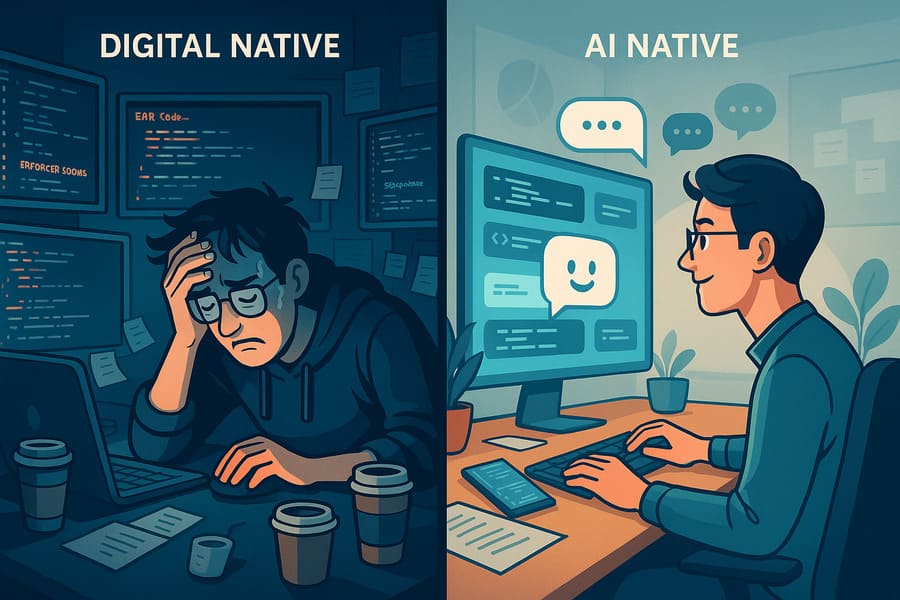
Picture a 200-line SQL query that has been running for three hours. Meanwhile, a colleague finishes the same analysis in 15 minutes by using ChatGPT to draft the initial query structure, then refining it through conversation.
That gap is the reality check facing IT professionals: being digitally fluent is no longer enough.
What "Tech-Savvy" No Longer Covers
Being a digital native is comfortable territory - navigating Kubernetes dashboards, writing infrastructure as code, debugging distributed systems at 2 AM. But treating AI as just another tool in the kit misses the shift underway.
The pattern shows up in everyday work. An engineer manually crafts transformation logic for hours during a data pipeline migration while another uses GitHub Copilot to generate, test, and deploy similar functionality in a fraction of the time - often with better documentation and comparable code quality.
Digital Native vs. AI Native
Digital natives use tools. They are comfortable with APIs, automation scripts, and cloud consoles, and they think in terms of: "I need to accomplish X, so I'll use tool Y to get there."
AI natives collaborate with intelligence. They think: "I want outcome X - let me work through the best path with AI." It's the difference between operating a calculator and working with a tutor who understands context.
The Differences That Matter
Problem-Solving Approach
- Digital native: "I need to write a monitoring script. Let me check the documentation, write the code, test it, debug it."
- AI native: "I need comprehensive monitoring. Let me describe my infrastructure to an AI assistant and iterate on solutions together."
Tool Interaction
- Digital native: Learns specific commands, syntax, and workflows for each tool
- AI native: Learns to communicate intent and iterate on solutions through natural language
Adaptability
- Digital native: Stays current with tool updates and new versions
- AI native: Focuses on problem-solving patterns that work across evolving AI capabilities
Why the Shift Changes the Work
The advantage isn't only individual productivity, though that part is real. It changes how technical problems get solved.
Speed to Solution: Describing a complex infrastructure problem and getting working Terraform code in minutes instead of hours is not just faster - it is a different operating mode.
Quality Through Iteration: AI doesn't get tired or make careless mistakes at 3 AM. It can help spot edge cases, suggest optimizations, and maintain consistency across large codebases.
Learning Acceleration: Instead of spending hours reading documentation for a new technology, a conversation with AI can surface concepts, examples, and a faster path to hands-on work.
Many organizations are already evaluating people on these capabilities, whether they state it explicitly or not.
A Practical Roadmap to AI Native
1. Start With Daily Pain Points
Don't try to change everything at once. Start with the repetitive work that drains the most time:
Data Analysis: Instead of writing complex pandas operations from scratch, describe the goal and let AI generate the initial code structure.
Documentation: Use AI to convert quick notes into proper technical documentation, or to explain complex code to stakeholders.
Debugging: Paste error logs and stack traces into AI tools for initial analysis and troubleshooting suggestions.
Code Review: Get AI feedback on code quality, security issues, and optimization opportunities before sending to human reviewers.
2. Learn Technical Conversation
This is where technical people often struggle. They are used to precise syntax and exact commands. AI works better with context and iteration.
Weak prompt: "Write a Python script for data processing"
Better prompt: "I need to process CSV files from our API logs, extract error patterns, and generate a daily summary report. The files contain timestamp, endpoint, status_code, and error_message columns. I want to identify the top 10 error patterns and track their frequency over time."
Best approach: Start with the better prompt, then iterate based on the results - "This is good, but can you add exception handling for malformed dates?" or "How would this perform with files larger than 1GB?"
3. Build an AI Tool Stack
Start with these categories and find what fits the workflow:
Code Generation & Analysis
- GitHub Copilot for real-time code completion
- ChatGPT or Claude for architecture discussions and complex problem-solving
- AI-powered IDEs like Cursor for integrated development
Infrastructure & DevOps
- AI-powered monitoring tools that can explain anomalies
- Cloud provider AI services for cost optimization and security recommendations
- AI assistants for cloud architecture reviews
Data & Analytics
- AI-powered SQL generation and optimization
- Natural language to query interfaces
- Automated insight generation from datasets
4. Apply Data Discipline to AI
Technical people already understand data quality, security, and privacy. The same discipline applies to AI interactions:
Be Selective With Sensitive Data: Never paste production credentials, customer data, or proprietary algorithms into public AI tools. Use sanitized examples or set up private AI instances.
Account for Training Data Limitations: AI models have knowledge cutoffs. For the latest cloud service features or recent security vulnerabilities, combine AI suggestions with current documentation.
Quality Control Everything: AI can make confident-sounding mistakes. Always review generated code, especially for security-critical components.
5. Treat AI as a Partner, Not a Replacement
The most effective approach treats AI like a capable junior colleague who never tires but sometimes needs guidance:
Delegate the Grunt Work: Let AI handle boilerplate code, initial research, and routine analysis. Reserve human effort for architecture decisions, business logic, and creative problem-solving.
Collaborate on Complex Problems: Use AI as a thinking partner - "I'm designing a microservices architecture for X requirements. What are the trade-offs between these approaches?"
Keep Technical Judgment: AI might suggest using a NoSQL database for everything or over-engineering a solution. Experience and judgment still decide.
Ethics and Responsibility
Technical professionals are often the ones implementing AI solutions for their organizations, which carries responsibility:
Transparency in AI Usage: Be upfront about when AI helped generate code or analysis, especially in peer reviews or client deliverables.
Bias Recognition: AI models can carry biases present in training data - particularly relevant for systems that make decisions about users or resources.
Security Considerations: AI-generated code can introduce vulnerabilities. Review for common issues like injection attacks, improper authentication, or data exposure.
Staying Current
The AI field changes faster than JavaScript frameworks. A few ways to keep pace:
Follow the Right Sources:
- Research blogs from major AI labs for new developments
- Applied-AI newsletters for industry use cases
- Technical communities focused on machine learning and AI
Experiment Regularly: Set aside time each week to try new AI tools or explore new capabilities in existing ones. Hands-on experience teaches the most.
Share What Works: Writing about real experiences and useful tools also sharpens your own understanding.
The Bottom Line
Becoming AI native isn't about mastering another technology stack. It's about changing how you approach problem-solving.
The technical professionals who do well over the next few years won't be the ones who memorize the most AI tools or write the most sophisticated prompts. They'll be the ones who blend human expertise with AI capabilities to solve problems neither could tackle alone.
Domain knowledge, systems thinking, and hard-earned technical judgment aren't becoming obsolete - they become more valuable when amplified by AI.
The transition starts small: pick one repetitive task and work through it with an AI tool on a real problem.


Leave a Comment