
Conductor: Netflix’s Microservices Orchestration Engine Explained
Introduction
Microservices solve problems. They also create new ones. When you break a monolith into dozens of services, coordinating them becomes the challenge.
Netflix faced this at scale. Streaming video to millions of users requires hundreds of microservices working together. A user clicks play. That triggers authentication, license validation, content retrieval, CDN selection, playback tracking, recommendation updates, and billing events. Each is a separate service. They all need to coordinate.
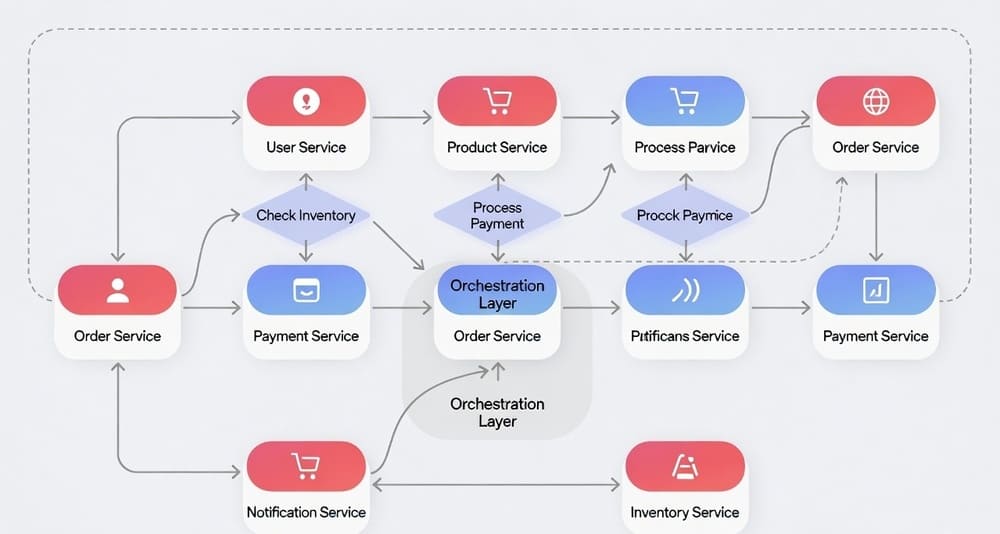
Conductor is Netflix’s answer. It’s an orchestration engine designed specifically for microservices workflows. Think of it as a traffic controller for distributed systems. Services register what they can do. Conductor coordinates when and how they execute.
This isn’t a data pipeline tool. It’s not for ETL or batch processing. Conductor handles business processes that span multiple services. Order fulfillment, user onboarding, content processing, payment flows. Anything that requires coordinating work across distributed systems.
This guide explains what Conductor is, when it makes sense, and how it differs from other orchestration tools.
What is Conductor?
Conductor is an open-source workflow orchestration engine. Netflix built it to manage complex microservices workflows at scale.
The core idea is separation of concerns. Your services implement business logic. Conductor handles orchestration logic. Services don’t need to know about each other. They just perform tasks when Conductor calls them.
Workflows are defined as JSON. They specify tasks, their order, and how data flows between them. Conductor executes these workflows, manages state, handles retries, and tracks progress.
Netflix open-sourced Conductor in 2016. Since then, companies like Tesla, GitHub, and Oracle have adopted it. The project remains active with regular releases and a growing community.
Core Architecture
Conductor has several components working together.
The Conductor Server is the brain. It manages workflow definitions, executes workflows, and coordinates task execution. The server exposes REST APIs for everything.
Workers are your microservices. They poll Conductor for tasks, execute them, and report results back. Workers can be written in any language. They just need to make HTTP calls.
The Database stores workflow definitions, execution history, and current state. Conductor supports Postgres, MySQL, and Cassandra. The choice depends on your scale and consistency needs.
The Queue manages task distribution. When a task is ready to execute, it goes into a queue. Workers poll queues for work. Conductor supports Redis, SQS, and other queue backends.
The UI provides visibility. You see running workflows, task status, execution history, and performance metrics. The UI helps with debugging and monitoring.
Everything communicates through APIs. This keeps components loosely coupled. You can scale each part independently.
How Workflows Work
A workflow in Conductor is a series of tasks with defined relationships.
You define workflows in JSON. Here’s a simplified example:
{
  "name": "order_fulfillment",
  "version": 1,
  "tasks": [
    {
      "name": "validate_order",
      "taskReferenceName": "validate",
      "type": "SIMPLE"
    },
    {
      "name": "charge_payment",
      "taskReferenceName": "payment",
      "type": "SIMPLE"
    },
    {
      "name": "ship_order",
      "taskReferenceName": "shipping",
      "type": "SIMPLE"
    }
  ]
}
This workflow has three tasks that run sequentially. Each task is implemented by a worker service.
When you start a workflow, Conductor creates an execution instance. It schedules the first task. A worker picks it up, executes it, and updates the result. Conductor then schedules the next task. This continues until the workflow completes.
State lives in Conductor. Workers are stateless. They receive input, do work, and return output. This makes workers simple and scalable.
Task Types
Conductor supports several task types. Each serves different orchestration needs.
Simple Tasks
The most common type. Your service implements the logic. Conductor just coordinates execution.
A worker polls for tasks:
GET /api/tasks/poll/validate_order
Conductor returns task data. The worker executes it and posts results:
POST /api/tasks
{
  "taskId": "abc-123",
  "status": "COMPLETED",
  "outputData": {
    "isValid": true,
    "orderId": "12345"
  }
}
Decision Tasks
Implement conditional logic in workflows. Based on task output, different paths execute.
{
  "name": "payment_decision",
  "type": "DECISION",
  "caseValueParam": "paymentMethod",
  "decisionCases": {
    "credit_card": [
      {
        "name": "process_credit_card",
        "type": "SIMPLE"
      }
    ],
    "paypal": [
      {
        "name": "process_paypal",
        "type": "SIMPLE"
      }
    ]
  }
}
If paymentMethod is “credit_card”, one path executes. If “paypal”, another path runs.
Fork and Join
Run tasks in parallel and wait for all to complete.
{
  "name": "parallel_processing",
  "type": "FORK_JOIN",
  "forkTasks": [
    [
      {"name": "process_inventory", "type": "SIMPLE"}
    ],
    [
      {"name": "notify_warehouse", "type": "SIMPLE"}
    ],
    [
      {"name": "update_analytics", "type": "SIMPLE"}
    ]
  ]
}
All three tasks run simultaneously. The join task waits for all to finish before proceeding.
Dynamic Tasks
Create tasks at runtime based on data. Useful when you don’t know the workflow structure ahead of time.
A dynamic task generates a list of tasks to execute. Conductor creates and runs them dynamically.
Sub-Workflows
Workflows can call other workflows. This enables reuse and composition.
A parent workflow includes a sub-workflow task:
{
  "name": "process_payment",
  "type": "SUB_WORKFLOW",
  "subWorkflowParam": {
    "name": "payment_workflow",
    "version": 1
  }
}
The sub-workflow executes completely before the parent continues.
Wait and Human Tasks
Pause workflows until external events occur. A human task waits for manual intervention. A wait task pauses for a specified time.
Useful for approval workflows or waiting for external systems.
HTTP Tasks
Make HTTP calls directly from Conductor without writing worker code.
{
  "name": "call_external_api",
  "type": "HTTP",
  "http_request": {
    "uri": "https://api.example.com/validate",
    "method": "POST",
    "body": {
      "orderId": "${workflow.input.orderId}"
    }
  }
}
Conductor makes the HTTP call and processes the response. Good for simple integrations.
When Conductor Makes Sense
Conductor excels in specific scenarios.
You have complex microservices workflows. Multiple services need to coordinate. The workflow has conditional logic, parallel execution, or long-running operations.
Business logic and orchestration should be separate. You don’t want orchestration code scattered across services. Centralizing it in Conductor makes changes easier.
You need visibility into running processes. Conductor tracks every workflow execution. You see exactly where things are, what succeeded, what failed.
Workflows are long-running. Some processes take hours or days. They span multiple services and might pause for external events. Conductor manages state throughout.
You require reliability and retries. Tasks fail. Networks are unreliable. Conductor handles retries automatically with configurable policies.
Workflows evolve frequently. Business requirements change. With Conductor, you update workflow definitions without changing service code.
Common Use Cases
Order Processing
E-commerce order fulfillment involves many steps. Validate order, check inventory, charge payment, notify warehouse, schedule shipping, send confirmation email.
Each step might be a different service. Some run in parallel. Some have dependencies. Payment must succeed before shipping begins.
Conductor orchestrates the entire flow. If payment fails, it doesn’t ship. If inventory is low, it might use a different warehouse. The workflow definition captures this logic centrally.
User Onboarding
When users sign up, multiple things happen. Create account, send verification email, set up initial data, trigger welcome sequence, notify sales team.
Some steps are conditional. Enterprise users get different onboarding than individual users. Some steps can fail and retry. Email might bounce and need resending.
Conductor manages the complexity. The workflow ensures nothing falls through the cracks.
Content Processing
Media companies process video uploads through multiple stages. Transcode to different formats, generate thumbnails, extract metadata, run quality checks, update CDN.
Each stage is compute-intensive and time-consuming. Some run in parallel. Some depend on previous outputs. Failures need intelligent retry logic.
Conductor coordinates the pipeline. It tracks progress, handles failures, and provides visibility into processing status.
Payment Flows
Payment processing has strict requirements. Charge the card, verify the transaction, update accounting, send receipt, trigger fulfillment.
These steps must happen in order. Failures require specific handling. Chargebacks might trigger reverse workflows. Compliance requires audit trails.
Conductor provides the reliability and tracking these workflows need.
Incident Response
When systems fail, runbooks kick in. Check dependencies, gather logs, restart services, verify health, notify on-call engineers, create incident tickets.
These actions span multiple systems. They have conditional logic based on what’s broken. They might require human intervention at certain points.
Conductor can orchestrate automated remediation with human checkpoints where needed.
How Data Flows
Data passing between tasks is critical. Conductor has a clear model.
Workflow input is provided when starting a workflow. It’s available to all tasks.
Task input comes from workflow input, previous task output, or static values. You use JSONPath expressions to reference data.
{
  "name": "charge_payment",
  "inputParameters": {
    "amount": "${validate.output.totalAmount}",
    "customerId": "${workflow.input.customerId}"
  }
}
This takes totalAmount from the validate task output and customerId from workflow input.
Task output is whatever the worker returns. It becomes available to subsequent tasks.
Workflow output is defined at the end. You specify which task outputs to include.
The data model is flexible. Tasks can produce complex objects. JSONPath lets you extract nested values.
Error Handling and Retries
Failures are inevitable. Conductor handles them systematically.
Task-level retries are configurable per task. Specify retry count, delay, and backoff strategy.
{
  "name": "call_external_service",
  "retryCount": 3,
  "retryDelaySeconds": 60,
  "retryLogic": "EXPONENTIAL_BACKOFF"
}
If the task fails, Conductor retries up to 3 times with exponential backoff.
Timeout handling prevents tasks from hanging forever. Set timeout values. If a task exceeds the timeout, Conductor marks it as failed and applies retry logic.
Compensation logic handles partial failures. When a workflow fails midway, you might need to undo previous steps. Conductor supports compensation tasks that run when failures occur.
Workflow-level error handling catches failures not handled at the task level. You can define fallback tasks or cleanup operations.
The combination provides robust failure handling without cluttering service code.
Scaling and Performance
Conductor is built for scale. Netflix runs millions of workflows daily.
Horizontal scaling works for all components. Run multiple server instances behind a load balancer. Add more worker instances as load increases. Scale the queue and database independently.
Queue-based architecture decouples producers and consumers. Workflows can be scheduled faster than workers process them. The queue buffers the load.
Stateless workers make scaling easy. Launch new workers without coordination. They poll for work and process it.
Database choices affect scale differently. Postgres and MySQL work for moderate scale. Cassandra handles massive scale with eventual consistency trade-offs.
Task isolation prevents one slow task from blocking others. Each task type has its own queue. Workers can specialize in specific task types.
Netflix runs Conductor handling hundreds of thousands of concurrent workflows. The architecture supports this through careful component design.
Monitoring and Observability
Visibility into workflow execution is critical.
The Conductor UI shows everything. Current running workflows, completed workflows, failed workflows. Drill into any workflow to see task status, timing, and data.
Metrics are exposed for monitoring. Track workflow start rate, completion rate, failure rate. Monitor task execution time, queue depth, worker utilization.
Integration with monitoring tools is straightforward. Conductor exposes metrics in formats Prometheus can scrape. Send events to logging systems.
Search and filtering help find specific workflows. Search by workflow ID, correlation ID, or any workflow input parameter.
Historical analysis shows trends over time. Which workflows fail most often? Which tasks are slowest? Where are bottlenecks?
This visibility helps teams optimize workflows and troubleshoot issues quickly.
Comparison with Alternatives
Conductor vs Temporal
Temporal is another workflow engine. It focuses on code-first workflow definitions.
Conductor uses JSON definitions. Temporal uses code (Go, Java, TypeScript, Python). Code is more expressive but less declarative.
Temporal’s execution model is different. It uses event sourcing and workflow history replay. This makes it extremely reliable but conceptually complex.
Conductor is simpler to understand. The execution model is straightforward. This makes it easier to adopt.
Use Temporal when you need complex stateful workflows with long-running operations and strong consistency guarantees. Use Conductor when you want simpler orchestration with good visibility.
Conductor vs Airflow
Airflow orchestrates data pipelines. Conductor orchestrates microservices.
Airflow excels at ETL and batch processing. It has strong scheduling and data dependency features.
Conductor handles event-driven workflows and long-running business processes. It’s built for always-on systems, not batch jobs.
The task model differs. Airflow tasks typically process data. Conductor tasks call services.
Use Airflow for data engineering. Use Conductor for microservices orchestration.
Conductor vs Step Functions
AWS Step Functions is a managed workflow service. It’s serverless and AWS-native.
Conductor is self-hosted and cloud-agnostic. You run the infrastructure.
Step Functions uses JSON state machines. Conductor uses JSON workflow definitions. The concepts are similar but syntax differs.
Step Functions integrates deeply with AWS services. Conductor integrates with anything via HTTP.
Use Step Functions if you’re all-in on AWS and want zero operations. Use Conductor for portability and more control.
Conductor vs Camunda
Camunda is a business process management platform. It implements BPMN (Business Process Model and Notation).
BPMN is a visual standard used by business analysts. Camunda targets business process automation.
Conductor targets developer workflows. It’s code and API focused rather than visual modeling.
Camunda has stronger human task management. Conductor is better for pure service orchestration.
Use Camunda when business users need to model processes. Use Conductor when developers are building service workflows.
Challenges and Limitations
Conductor isn’t perfect. Several issues come up.
Learning curve exists. Understanding workflows, tasks, and the execution model takes time. The concepts aren’t difficult but they’re new to many teams.
Operational overhead is real. You run and maintain the Conductor infrastructure. Database, queue, servers all need operations.
JSON verbosity can be annoying. Large workflows become hard to read. Some teams generate Conductor JSON from other formats.
Debugging can be tricky when workflows are complex. Following execution through many conditional branches and parallel tasks requires patience.
No built-in versioning strategy means you handle workflow versions yourself. Updating workflows while old versions are running requires care.
Queue management needs attention at scale. Queue depth, task distribution, and worker capacity require monitoring and tuning.
Error handling complexity increases with workflow complexity. Building robust error handling and compensation logic takes effort.
Best Practices
Teams running Conductor in production have learned what works.
Keep workflows focused. Don’t create massive workflows that do everything. Break them into smaller, composable pieces using sub-workflows.
Design idempotent tasks. Tasks might execute multiple times due to retries. Make sure running a task twice produces the same result.
Set reasonable timeouts. Don’t let tasks run forever. Set timeouts based on expected execution time plus buffer.
Implement proper retry logic. Not all failures should retry. Distinguish between transient failures (network issues) and permanent failures (invalid input).
Use correlation IDs. Pass correlation IDs through workflows. This helps trace requests across services and workflows.
Monitor queue depth. High queue depth means workers can’t keep up. Scale workers or optimize task execution.
Version workflows carefully. When updating workflows, consider running instances. Use workflow versions to manage changes.
Test workflows thoroughly. Unit test task implementations. Integration test entire workflows. Simulate failures to verify error handling.
Document workflow purpose. Add descriptions to workflows and tasks. Future maintainers need to understand the business logic.
Archive old executions. Don’t keep workflow history forever. Archive or delete old executions to keep the database manageable.
Getting Started
Setting up Conductor is straightforward.
The quickest start is using Docker:
docker run -p 8080:8080 -p 5000:5000 conductoross/conductor-standalone:latest
This runs Conductor with an in-memory database. Good for development, not production.
For production, you need persistent storage. Set up Postgres or MySQL. Configure Conductor to use it. Deploy the server behind a load balancer. Set up Redis or another queue backend.
Create a workflow definition:
curl -X POST http://localhost:8080/api/metadata/workflow \
  -H 'Content-Type: application/json' \
  -d @workflow.json
Implement workers in your services. Poll for tasks, execute them, update results.
Start a workflow:
curl -X POST http://localhost:8080/api/workflow/order_fulfillment \
  -H 'Content-Type: application/json' \
  -d '{"orderId": "12345", "customerId": "67890"}'
Access the UI at http://localhost:5000 to see execution.
The documentation provides detailed setup guides for different configurations.
Real-World Usage
Many organizations run Conductor in production.
Netflix obviously uses it extensively. Thousands of workflows manage content processing, user interactions, and platform operations.
Tesla orchestrates manufacturing and logistics workflows with Conductor.
GitHub uses it for internal automation and workflow management.
Redfin runs real estate transaction workflows through Conductor.
Oracle integrated Conductor into their cloud platform offerings.
The common thread is complex business processes spanning multiple services. These companies needed reliable orchestration at scale.
The Path Forward
Conductor continues to evolve. The project remains active with regular releases.
Better developer experience is a focus. Improved SDKs, easier testing, better local development support.
Enhanced observability with deeper metrics, distributed tracing integration, better debugging tools.
Performance improvements for very high scale deployments. Optimizations in queuing, task execution, and state management.
Cloud-native features like better Kubernetes integration and cloud provider integrations.
Community growth continues. More contributors, more integrations, more shared patterns.
The project is stable and production-ready. Netflix’s continued investment ensures it stays maintained.
Key Takeaways
Conductor is a workflow orchestration engine designed for microservices.
It separates orchestration logic from business logic. Services implement tasks. Conductor coordinates execution.
Common use cases include order processing, user onboarding, content processing, and payment flows. Any complex business process spanning multiple services fits.
The architecture is scalable. Netflix runs millions of workflows daily on Conductor.
Challenges include operational overhead, learning curve, and JSON verbosity. But the benefits outweigh these for teams with complex orchestration needs.
Conductor differs from data pipeline tools like Airflow. It’s built for service orchestration, not ETL.
Compared to Temporal, it’s simpler but less feature-rich for very complex stateful workflows.
If you’re building microservices and need to coordinate them reliably, Conductor is worth serious consideration.
Start small. Orchestrate one workflow. Learn the patterns. Expand from there.
The open-source nature means no vendor lock-in. The active community provides support and shares patterns.
Tags: Conductor, Netflix OSS, workflow orchestration, microservices orchestration, distributed systems, workflow engine, service orchestration, business process automation, task orchestration, event-driven architecture, workflow management, microservices coordination, distributed workflow, saga pattern, service mesh




