Designated Timestamp & Partitions in QuestDB: How to Nail Schema Design for Fast Time-Series Analytics
The schema problem behind slow time-series queries
A firehose of metrics - devices, services, or trades - pours into QuestDB. Queries are fine at first, then dashboards slow, retention chores hurt, and backfills get scary. Nine times out of ten, the root cause is schema: the designated timestamp and partitions. Get these right and most performance problems vanish.
What "designated timestamp" means
QuestDB elects one timestamp column as the time axis for the table. That choice unlocks the time-series engine: partition pruning, interval scans, ASOF/LATEST semantics, and more. Only timestamp or timestamp_ns columns can be designated, and there's exactly one per table. (QuestDB)
A dynamic timestamp can also be set in a query with timestamp(column) - useful to "pivot" to a different time column for analysis without changing the table. (QuestDB)
Create example:
CREATE TABLE sensor_readings (
  ts           TIMESTAMP,           -- designated timestamp
  device_id    SYMBOL CAPACITY 1_000_000 NOCACHE,
  temperature  DOUBLE,
  status       SYMBOL,
  location     STRING
) TIMESTAMP(ts) PARTITION BY DAY WAL;
TIMESTAMP(ts)elects the designated timestamp.PARTITION BY DAYlays out files by day.WAL(write-ahead log) is the default for new tables and is what you want for reliability and ingestion concurrency. (QuestDB)
Partitions: how QuestDB physically organizes time
QuestDB splits data by time intervals: NONE, YEAR, MONTH, WEEK, DAY, HOUR. Partitioning is only available when there is a designated timestamp. ILP-created tables default to DAY (configurable via line.default.partition.by). (QuestDB)
Partitions do three things for performance:
- The optimizer skips entire files for out-of-range queries (partition pruning).
- Retention is as simple as dropping old partitions.
- Out-of-order ingestion is handled efficiently at partition boundaries. (QuestDB)
Introspect partitions:
SHOW PARTITIONS FROM sensor_readings;
-- or
SELECT * FROM table_partitions('sensor_readings');
(QuestDB)
Choosing the right partition grain
Pick the coarsest partition that still prunes effectively for the queries. Too fine (e.g., HOUR) means lots of tiny files and higher overhead. Too coarse (e.g., YEAR) means poor pruning.
Decision table (rules of thumb):
| Typical query window | Ingestion rate | Cardinality (keys/tags) | Recommended PARTITION BY | Rationale |
|---|---|---|---|---|
| ≤ 24h (dashboards, alerts) | High (100k+ rows/sec) | High | DAY | Strong pruning; manageable file counts. |
| 1-8 hours (low-latency ops) | Very high | Very high | HOUR | Enables tight pruning and parallelism; watch file counts. |
| 7-90 days (BI, finops) | Moderate | High | WEEK or MONTH | Coarser partitions = fewer files + easy retention. |
| ≥ 1 year (archives) | Low | Low | YEAR | Minimal overhead; queries usually pre-filter by year. |
Use SHOW PARTITIONS in staging to see how many files get created and adjust. (QuestDB)
Symbols vs strings: model high-cardinality tags correctly
QuestDB's SYMBOL stores repetitive strings via an internal dictionary (int↔string), increasing scan and filter speed and saving disk. Set CAPACITY and CACHE/NOCACHE per column; index symbols when they are filtered on often. (QuestDB)
Quick rules:
- Use
SYMBOLfor tags likedevice_id,region,status. - Use
STRINGfor free-text or large, unique values (location, error messages). - For very high cardinality (100k+ distinct), consider
NOCACHEto avoid heap pressure; lookups stay fast due to memory-mapping. (QuestDB)
Query patterns that benefit from the designated timestamp
- Interval scans:
WHERE ts BETWEEN now()-24h AND now()prunes partitions before scanning. (QuestDB) - Time-series joins:
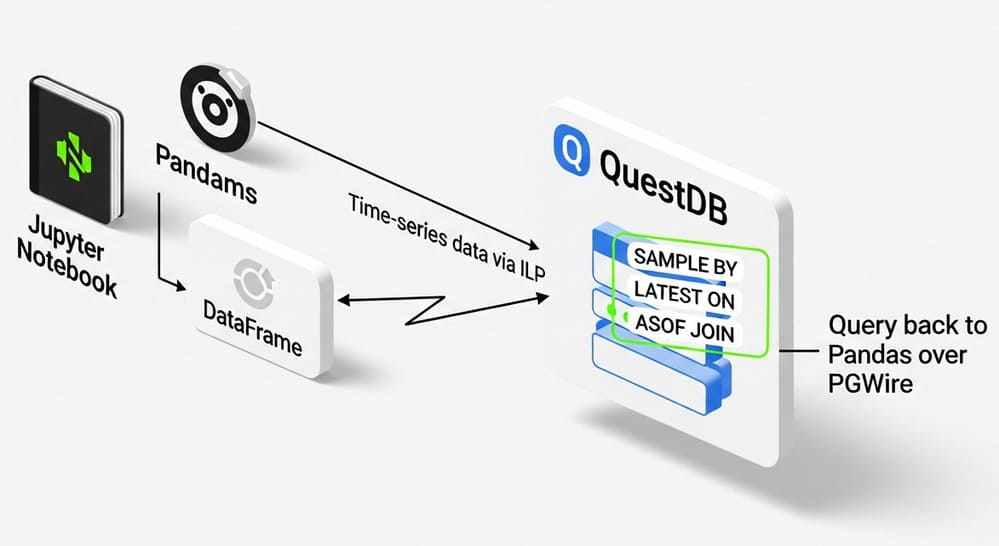
ASOF JOINuses the table's designated timestamp by default to match "closest preceding" rows. (QuestDB) - Latest per key:
LATEST ON ts PARTITION BY device_idgets last observations cleanly. (QuestDB)
Real example: rolling up minute stats and querying
Load synthetic data:
CREATE TABLE metrics (
  ts TIMESTAMP,
  host SYMBOL CAPACITY 10000 NOCACHE,
  cpu DOUBLE,
  mem DOUBLE
) TIMESTAMP(ts) PARTITION BY DAY WAL;

INSERT INTO metrics
SELECT
  timestamp_sequence('2025-01-01T00', 1000L) as ts,  -- 1 row/sec
  rnd_symbol(100, 0, 9999, 0)         as host,
  rnd_double(0.0, 100.0, 2)           as cpu,
  rnd_double(0.0, 100.0, 2)           as mem
FROM long_sequence(10_000_000);
Downsample with SAMPLE BY to 1-minute rollups (materialize if it's a hot query):
-- Ad-hoc:
SELECT ts, host, avg(cpu) AS cpu_avg, avg(mem) AS mem_avg
FROM metrics
SAMPLE BY 1m ALIGN TO CALENDAR
FILL(LINEAR) BY host;

-- Materialized view (optional):
CREATE MATERIALIZED VIEW metrics_1m
AS SELECT ts, host, avg(cpu) cpu_avg, avg(mem) mem_avg
   FROM metrics SAMPLE BY 1m ALIGN TO CALENDAR FILL(LINEAR) BY host;
Because ts is designated and the table is partitioned, the engine prunes day partitions and executes vectorized scans quickly. (QuestDB)
Retention without 2am surprises
Retention is deleting time ranges. With partitions, it's one command and non-blocking:
-- Drop everything before 2025-06-01:
ALTER TABLE metrics DROP PARTITION WHERE ts < '2025-06-01';
Dropping partitions is designed to be non-blocking; it provides atomicity per partition, and it's the recommended retention path. (QuestDB)
Important: A table's partitioning cannot be changed after creation. If the grain was chosen poorly, create a new table with the right
PARTITION BY, copy data, then swap. Plan the grain up front. (QuestDB)
Common pitfalls (and how to avoid them)
- Wrong grain (too fine):
HOURfor slow data means too many tiny partitions and overhead. PreferDAYunless small hour slices are queried frequently. (QuestDB) - No designated timestamp: Partitioning, pruning, and ASOF/LATEST defaults are all lost. Always set
TIMESTAMP(col)at creation. (QuestDB) - Storing tags as
STRING: Switch toSYMBOLwith proper capacity; considerNOCACHEfor huge cardinalities; index hot filters. (QuestDB) - Relying on PGWire for heavy ingest: Prefer ILP for raw throughput; ILP-created tables default to
PARTITION BY DAY(configurable). (QuestDB) - Retention with row deletes: Use
ALTER TABLE … DROP PARTITIONinstead. (QuestDB)
Quick reference: weekly patterns
- Create with day partitions:
CREATE TABLE t (...) TIMESTAMP(ts) PARTITION BY DAY WAL; - Check partition layout:
SHOW PARTITIONS FROM t; - Latest per symbol:
SELECT LATEST ON ts PARTITION BY device_id * FROM t; - Time-proximity join:
SELECT * FROM a ASOF JOIN b ON a.ts = b.ts AND a.device_id = b.device_id; - Dynamic timestamp at query time:
SELECT * FROM t TIMESTAMP(other_ts);
Reference docs
- Designated timestamp - concept, properties, dynamic timestamp. (QuestDB)
- Partitions - available intervals, defaults, SHOW PARTITIONS. (QuestDB)
- CREATE TABLE - syntax for
TIMESTAMP(col)andPARTITION BY. (QuestDB) - Schema design essentials - best practices for symbols, partitions, TTL, dedup. (QuestDB)
- ALTER TABLE DROP PARTITION - non-blocking retention. (QuestDB)
- Symbol type - capacity, cache, indexing. (QuestDB)
Summary
Three things to keep:
- Always elect a designated timestamp.
- Choose the coarsest partition that still prunes well for the queries (usually DAY).
- Model tags as SYMBOL, not
STRING, and plan retention with DROP PARTITION.
Leave a Comment